
The End of the "123456": Why Passwordless is the Future
- 3 days ago
- 3 min read
We’ve all been there: staring at a login screen, trying to remember if the password was the one with the exclamation point or the one with your dog's birthday.
Passwords are a 60-year-old solution to a modern problem, and frankly, they’re failing us.
Enter Passwordless Authentication. It’s exactly what it sounds like: a way to verify who you are without typing a single character into a password field.
What is Passwordless Authentication?
Passwordless authentication is a verification method where a user gains access to an application or service without entering a traditional password. Instead of "something you know" (which can be stolen or forgotten), it relies on something you have (a smartphone or security key) or something you are (a fingerprint or face scan).
How Does It Work?
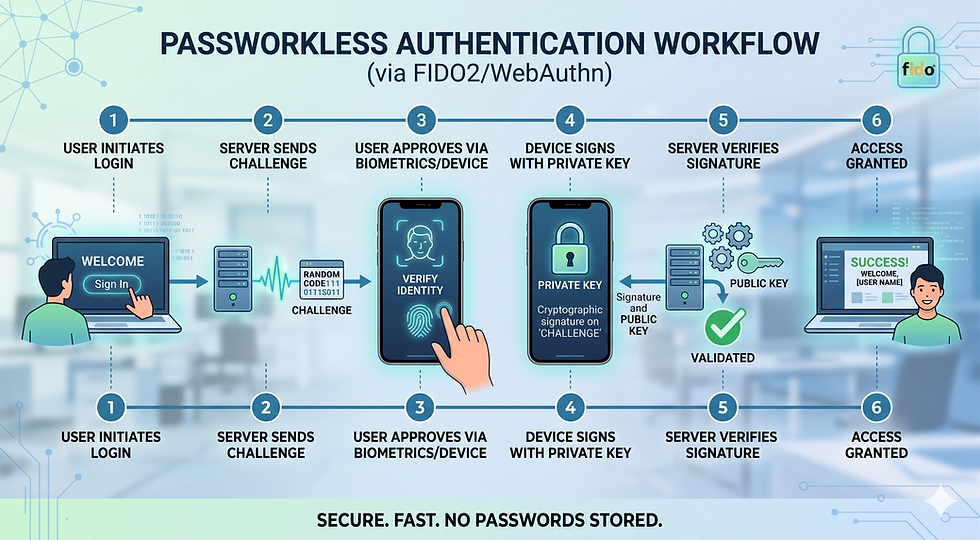
Behind the scenes, most passwordless systems use Public Key Cryptography. Here’s the simple version:
The Pair: Your device creates two digital keys: a public key (stored by the app) and a private key (stored securely on your device).
The Challenge: When you try to log in, the app sends a "challenge" to your device.
The Verification: You unlock your device (via face scan, fingerprint, or PIN). Your device uses the private key to sign the challenge and sends it back.
The Access: The app verifies the signature with the public key. If they match, you’re in. Your private key never leaves your device.
The Standard Workflow
Initiation: The user enters their identifier (like an email or username) into the application’s login field.
Challenge Generation: The server recognizes the user and sends a unique, one-time cryptographic "challenge" to the user's registered device.
Local Authentication: The user is prompted to unlock their device using a local verification method, such as biometrics (fingerprint or face scan) or a hardware security key.
Cryptographic Signing: Once verified locally, the device uses its private key—which never leaves the hardware—to sign the server’s challenge.
Verification: The signed response is sent back to the server. The server uses the corresponding public key (stored during registration) to verify the signature.
Access Granted: If the signature is valid, the server authenticates the user and grants access to the application.
Pros and Cons
Pros | Cons |
Superior Security: Virtually eliminates phishing and "brute-force" guessing. | Device Dependency: If you lose your phone or security key, recovery can be tricky. |
Better User Experience: No more "Forgot Password" loops; logins take seconds. | Implementation Costs: It can be expensive for companies to overhaul legacy systems. |
Reduced IT Costs: Fewer helpdesk tickets for password resets. | Software Limits: Not all older browsers or operating systems support it yet. |
Passwordless vs. Password-Based: When to Use Which?
Choosing the right method depends on your audience and the sensitivity of the data.
Use Passwordless Authentication when:
High-Security is Critical: For banking, healthcare, or internal corporate access where a single breach could be catastrophic.
Customer Conversion Matters: For e-commerce or consumer apps where a friction-free login means more sales.
Mobile-First Apps: Users hate typing long passwords on tiny mobile keyboards.
Use Password-Based (with MFA) when:
Legacy Systems: You are using older software that simply doesn't support modern protocols like FIDO2.
Universal Access is Required: If your users might not have access to smartphones or biometric-capable hardware.
As a Backup: It’s often helpful to keep a password as a "Plan B" recovery method while encouraging passwordless as the primary choice.
The Bottom Line
The transition to a passwordless world isn't just about convenience; it's about closing the massive security gaps that passwords have left wide open for decades. While we aren't completely "password-free" yet, moving toward Passkeys and biometric logins is the best way to protect your digital life.
NOTE: When you build applications using the Wizergos Low Code Platform, you can enable Passwordless Authentication just by checking a checkbox. All the heavy lifting of implementing the secure workflows are already built-in. As an application developer, all you need to do is understand your users and pick the right solution.


Comments